
TattingCAD FAQ – Tatting Pattern Software for Needle and Shuttle Tatting
What is TattingCAD?
TattingCAD is a tatting pattern software designed for needle and shuttle tatting. It allows you to create detailed and accurate tatting patterns that are difficult to produce in general-purpose design programs.
Unlike Inkscape, CorelDraw, Illustrator, or Photoshop, TattingCAD is built specifically for tatting pattern design. Rings and chains are sized according to notation, not arbitrary line placement, ensuring consistency in your patterns.
The base measurement in TattingCAD is a double stitch (ds). For example, a 10ds chain will maintain its length even when bent or twisted using the Path Edit tool. If the chain is too short to connect elements, adjust the notation to keep your pattern flat.

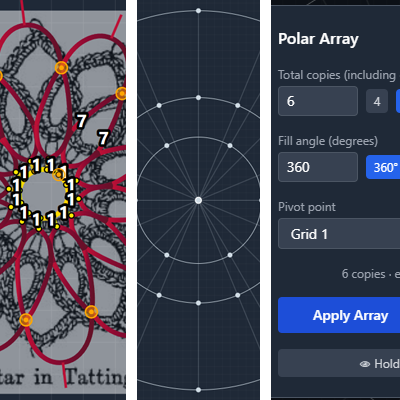
How does the workflow in TattingCAD work?
There are several ways to design tatting patterns in TattingCAD:
- Reference Images: Trace sketches as a background for your pattern.
- Polar Grids: Easily align and connect motifs.
- Array Tool: Repeat elements vertically, rotate them, or create spiral patterns.
After designing your pattern in Planning View, assign Tatting Order Numbers to each element. This defines the sequence in which elements should be created and is used when generating the final written pattern.
How to get a written tatting pattern?
To generate a clear written pattern, assign a Tatting Order to every element or at least key repeating elements.
Use View → Tatting Order Mode to select elements and click “Assign Next” to quickly number large patterns.
For repeating elements, not every element needs a number, but some text may need editing to polish the pattern.
To export a written pattern: File → Output Notation to Clipboard, then paste into any text editor. Remove unnecessary elements if needed (e.g., unnumbered elements in repeating patterns).
Vintage #9-Star in Tatting:
=== Round 1 ===
1. r: 11*(1ds-jp)-1ds-Mock Picot
=== Round 2 ==
Repeat:
1. r: 7ds-jp//r1-Round 1//-7ds RW
2. c: 5ds-p-5ds RW
How does TattingCAD work?
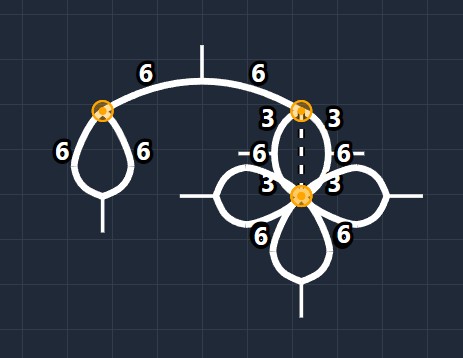
TattingCAD is fully notation-based.
Basic elements: Ring, Chain, Line, Split Ring
Notation-only elements: Behave like basic elements but display different notation in the output.
Example – Josephine Knot:
1. Create a ring.
2. Change its notation from `r:` to `jk:`.
3. Use `ss` (Single Stitch) instead of `ds` (Double Stitch).
Other notation options include `lss` (Left Single Stitch) and `rss` (Right Single Stitch).
How does TattingCAD estimate real-life measurements?
Instructions are in Help → Quick Start, but here is the basic workflow:
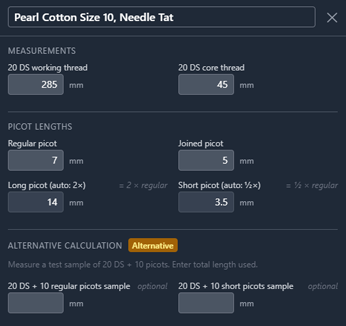
- Tat at least one ring.
- Measure the thread used.
- In Options → Thread Properties, create measurements for different thread thicknesses or techniques.
These measurements affect the Ruler, Polar Grid sizing, and material usage estimates in your output tatting pattern.
How to change the color of elements?
TattingCAD uses a Materials system instead of a palette:
- Go to Options → Materials to add or edit materials.
- Click the swatch to open a color picker with the DMC color catalog.
- Choose solid colors or gradients.
Up to 15 materials can be used in a single project.
What is the red glow around an element and how do I remove it?
A red glow indicates invalid notation. The element remains but is highlighted to show an error.
Common mistakes:
- Missing `ds` or `ss` after a number
- Two picots in a row without stitches between them
Correct the notation, and the red glow will disappear.
Can I sell patterns created with TattingCAD?
Yes. TattingCAD is designed to help you create new and unique tatting patterns. You are free to sell the patterns you design.
If you find TattingCAD useful, you can support its development here: Ko-fi donation link
If you have any ideas for the program, don’t hesitate to contact me.
Where to get TattingCAD?
You can download it from the GitHub page.
It is available for: Windows, Linux, macOS, and Android.
Note that TattingCAD is an independent release and the installers are currently unsigned.
This means your OS may show a security warning — this is expected and safe to dismiss. On MacOS further actions are needed. Refer to the Release notes and ReadME on GitHub project page.